Money & Data
We pay for HOA management. Homeowners should get secure online tools and modern payment options.
In plain terms
- Money: homeowners still can’t pay HOA dues electronically in 2026.
- Data: the reinspection portal is directed to an HTTP-only website (not HTTPS).
- Expectation: if owners are required to use a portal to comply with enforcement, that portal should be secure and reliable.
What we pay for vs. what we get
This site’s thesis is simple: if the HOA pays a management vendor to run owner-facing systems, those systems should meet modern baseline standards.
- Reinspection workflow: notices direct owners to
http://mjfarb.com/reinspect/(HTTP, not SSL/HTTPS). - Payments: owners cannot pay assessments online (no portal, no autopay), even though this is standard for most HOAs.
- Account clarity: statements show a lump-sum balance that appears to mix disputed charges with routine dues.
Sources: hearing response, Nov 2025 statement, Jun 2026 statement.
HTTPS / SSL: why it matters
HTTPS is the standard way websites protect information in transit. When a site is HTTP-only, data can be exposed on public Wi‑Fi or through intermediaries.
Here’s documented evidence that the reinspection site is not served over HTTPS.
Screen recording (March 2, 2026) purporting to demonstrate that the reinspection website blocks HTTPS access.
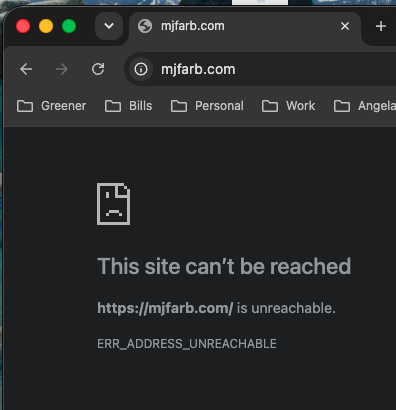
https://mjfarb.com/ shows “This site can’t be reached.”Related: the hearing response directs owners to http://mjfarb.com/reinspect/ (HTTP) for reinspection requests.
Payments: e-checks and practical options
Most homeowners expect a simple way to pay HOA dues electronically (ACH / e-check, card payments, autopay). This site documents that Dawson Landing homeowners still lack that in 2026.
What’s missing today
- No online payment portal for assessments
- No autopay / scheduled electronic payments
- Statements can appear unitemized, making it harder to pay undisputed amounts cleanly
What owners can do as an interim workaround (if the HOA accepts mailed payments)
This is not an official HOA instruction set; it’s a practical workaround many homeowners use. Confirm payee name and mailing address with the HOA before relying on it.
- Open your bank’s “Bill Pay” (often called “Send a check” or “Pay a company”).
- Create a new payee using the HOA’s name and mailing address (often the HOA PO Box).
- In the memo/reference field, include your lot/address and account number so the payment can be applied correctly.
- Schedule the payment 7–10 days early (banks often mail a physical check).
- Save a confirmation screenshot or reference number.
What the HOA (and management) should provide
Electronic payments are a standard service. If the HOA is paying MJF/MJFARB for management and owner-facing systems, it is reasonable to expect:
- Secure HTTPS portal for compliance workflows
- Online dues payment (ACH/e-check) and optional autopay
- Itemized account statements that separate routine dues from disputed charges
Data handling and privacy expectations
Homeowners commonly expect encrypted portals when entering account-related information (account numbers, emails, addresses, violation reference codes). Even where no specific law applies, encryption is a baseline modern expectation.
GDPR is often discussed in privacy contexts, but this site does not claim it applies here. The practical point is that HTTP-only owner portals are below standard in 2026.
What to do next
- Use the case assistant: Take Action → Case assistant
- Download evidence: Take Action → Evidence pack
- Ask the board for HTTPS + e-pay in writing (use the email template): Take Action